

Notezilla : Boost Productivity with Smart Note Management
Notezilla: in summary
Notezilla is a versatile note-taking software designed for individuals and teams seeking efficient information management. Ideal for professionals, students, and anyone requiring organized note systems, Notezilla boasts features like sticky notes with reminders, flawless cloud synchronization, and seamless cross-device access.
What are the main features of Notezilla?
Efficient Note Organization
Streamline your note-taking experience with Notezilla’s advanced organizational tools. Perfect for users who need a decluttered space, these features cater to diverse note-keeping needs:
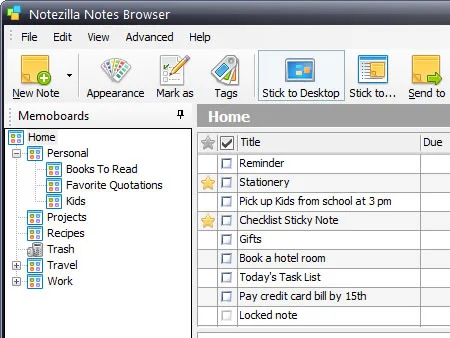
- Sticky notes with tags for easy categorization
- Creation of notebooks for topic-based note sorting
- Advanced search functionality to locate notes quickly
- Color coding options for visual organization
Seamless Cross-Device Synchronization
Access your notes anywhere, anytime, with Notezilla’s impeccable synchronization capabilities. Designed for modern users who switch between multiple devices, these features ensure your notes are always at your fingertips:
- Real-time sync across Windows, Mac, iOS, and Android platforms
- Instant updates to notes with automatic cloud sync
- Offline access with subsequent updates once connected
- Backup features to prevent data loss during sync
Advanced Reminders and Alerts
Never miss a task with Notezilla’s comprehensive reminder and alert functionalities. Tailored for busy individuals needing timely notifications, these features help you stay on top of your schedule:
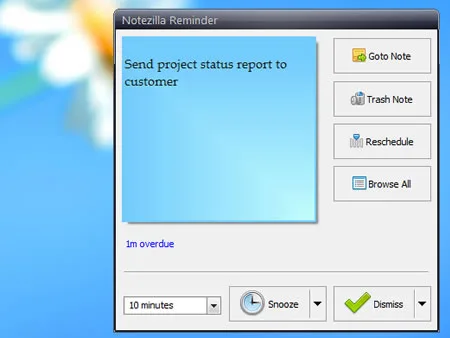
- Set one-time or recurring reminders effortlessly
- Set priority alerts for important tasks
- Integrate with calendar apps for seamless scheduling
- Popup reminders even if the application is closed
Unleash the full potential of your productivity with Notezilla’s smart note management tailored to simplify your life and keep your tasks on track.
Screenshots

Notezilla: its rates
standard
Rate
On demand
Customer reviews about Notezilla
Appvizer calculates this overall rating to make your search for the best software easier. We've based it on user-generated verified reviews on industry-leading websites.